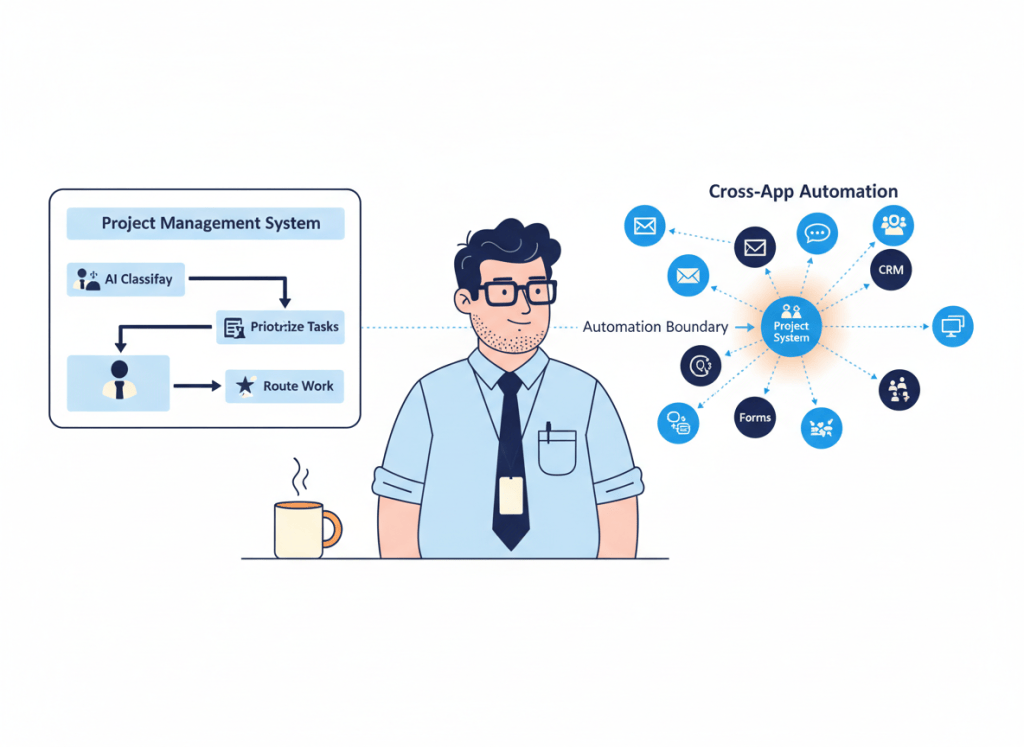
Asana can now automate much more than status changes and task assignments. AI Studio lets teams build no-code AI workflows inside Asana, use work context to classify and route requests, and connect some triggers and actions to third-party tools.
That creates an obvious stack question: if Asana is already your team’s work hub, do you still need Zapier?
Sometimes no. But the useful dividing line is not “Asana handles internal work, Zapier handles external apps.” Both products now cross that boundary. A better test is where the workflow’s logic, data, and ownership naturally belong.
What Asana AI Studio changes
Asana AI Studio is a no-code builder for AI-powered workflows that run where teams already manage work. It can use Asana context to automate repetitive steps, classify and prioritize work, route requests, and deploy AI-driven processes inside existing projects.
Asana also says AI Studio workflows can attach information from other data sources and use triggers and actions connected to third-party apps. So it would be inaccurate to treat AI Studio as a sealed Asana-only automation layer.
On current paid plans, AI Studio Basic is included. Asana Starter is $10.99 per user per month when billed annually and includes 50K AI Studio credits per billing account per month plus unlimited automations. Advanced is $24.99 per user per month when billed annually and includes 75K AI Studio credits per billing account per month. Usage and packaging can change, so check the current plan before designing around a credit allowance.
Zapier is now broader than a connector between two apps
Zapier’s core advantage is still breadth. Its current platform supports more than 9,000 app integrations and combines workflows with tools such as Forms, Tables, MCP, AI steps, and other orchestration capabilities.
That matters when a business process is not really an Asana process. A lead might start in a form, pass through enrichment, enter a CRM, trigger an email, alert a Slack channel, create an Asana task, and later update another system. Asana may participate in that workflow without being the natural place to own all of it.
Zapier currently offers a free plan with 100 tasks per month. Professional starts at $19.99 per month and adds multi-step Zaps, premium apps, webhooks, and other capabilities. Pricing is usage-sensitive, so the cost question should include how many actions your workflows execute, not just the headline subscription price.
| Workflow shape | Better starting point | Why |
|---|---|---|
| Work is created, classified, prioritized and routed mainly in Asana | Asana AI Studio | The context and destination already live in the work system |
| Asana is one step in a process spanning many SaaS tools | Zapier | Cross-app orchestration is the main problem |
| External event only needs to start an Asana-centered workflow | Test AI Studio first | You may not need a second automation layer |
| Workflow needs webhooks, many app actions, or reusable cross-system logic | Zapier is more likely to fit | The automation layer needs to sit above individual apps |
| Both tools perform the same routing or update | Remove one owner | Duplicate automation creates hidden maintenance |
Use the system of work test
Ask one question before choosing the automation platform: where would a teammate go to understand this workflow if the automation disappeared tomorrow?
If the answer is an Asana project, AI Studio is a natural first place to build. The workflow can stay close to the tasks, fields, projects, assignments, and context that explain why the automation exists.
If the answer is “there is no single app; this is a company process across several systems,” a platform such as Zapier has a stronger architectural case.
This is also why our Asana AI vs ClickUp Brain comparison focuses on the intelligence inside the work-management environment, while our Zapier vs Make vs n8n guide focuses on the automation layer between systems.
The hidden problem is duplicate automation
As apps add their own AI and automation builders, teams can accidentally automate the same transition twice.
An Asana rule updates a field. A Zap watches the same event and updates it again. AI Studio classifies a request while an external automation also classifies it. A notification fires from both layers. Months later, nobody remembers which system owns the decision.

The fix is not to choose one platform for everything. Give each transition one owner.
- Asana owns work-state logic: task classification, project routing, priority, assignment, and work-context decisions that belong in Asana.
- Zapier owns cross-system transport and orchestration: processes whose value comes from coordinating multiple apps, data sources, or endpoints.
- One boundary owns the handoff: decide exactly which layer passes data between the two so the same event is not processed twice.
When Asana AI Studio may let you remove a Zap
Look first at automations that exist mainly to manipulate Asana work.
If a Zap receives an Asana event, performs a simple classification or routing decision, and writes the result straight back to Asana, ask whether AI Studio or native Asana automation can now own the entire job. Removing that external loop can reduce credentials, failure points, task usage, and maintenance.
The same applies when an external trigger is supported directly by the Asana workflow and everything meaningful after that trigger happens inside Asana. Do not keep a middleware subscription merely because it was the only option when the workflow was first built.
When keeping Zapier is the cleaner choice
Keep the external automation layer when Asana is only one participant in a broader process.
Examples include lead routing across forms, CRM, messaging and project tools; employee onboarding across HR, identity, email and task systems; or customer operations that need webhooks, custom actions, tables, and several downstream destinations.
Zapier’s integration breadth matters most in exactly these cases. The automation is valuable because it coordinates systems, not because it makes Asana smarter.
If your use case is becoming more autonomous, our AI agent vs automation guide can also help separate a predictable workflow from work that genuinely needs an agentic layer.
Audit the stack before adding or removing anything
Do not cancel Zapier because Asana added AI Studio, and do not automatically build every new Asana workflow in Zapier because that is what your team already knows.
List your current automations and mark four things: trigger, system that owns the business decision, systems touched, and final destination. Then look for workflows where the automation platform is doing little more than leaving Asana and immediately coming back.
Those are your best consolidation candidates. Our AI productivity stack audit uses the same job-first approach for overlapping software subscriptions.
WTA VERDICT
Asana AI Studio can replace some Zapier workflows, but it does not make a cross-app automation platform automatically redundant.
Start with AI Studio when Asana is the system where the workflow’s context, decisions, and destination naturally live. Keep Zapier when the real job is coordinating a process across many systems. If you use both, define the boundary clearly and remove duplicate logic.
3-Line Takeaway
- Asana-centered work: test AI Studio before adding another automation layer.
- Cross-app processes: Zapier still has a strong role when orchestration is the main problem.
- Using both: give every workflow transition one owner so duplicate automation does not accumulate.
WorkTech Atlas did not receive payment from the companies discussed here. This article is based on current public product information; pricing, credits, integrations, and features can change.

Leave a comment