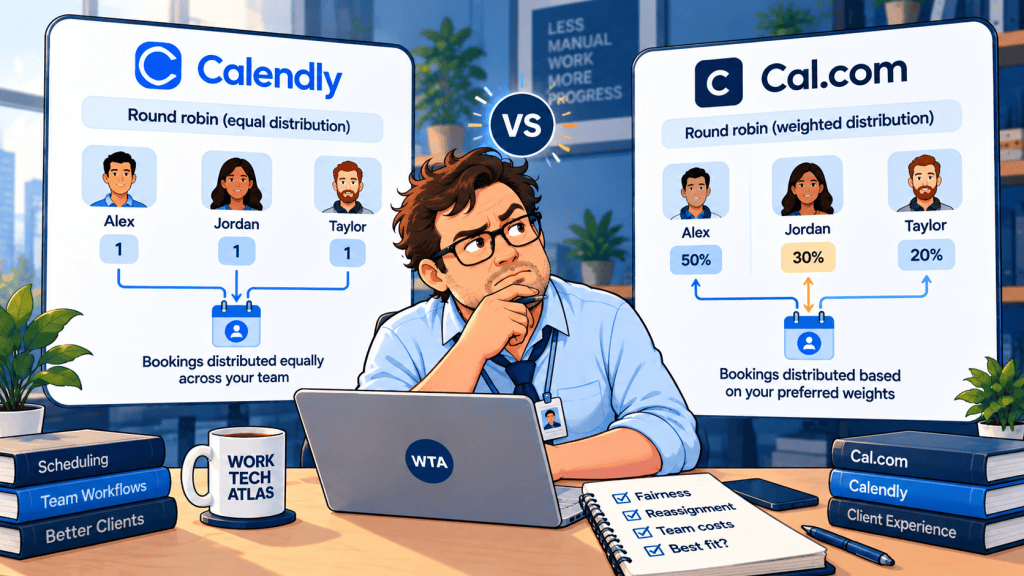
Three consultants share a booking link. One works four days a week, one works two, and one handles urgent calls. The team wants clients to see the earliest appointment, but it also wants assignments to feel fair. Then a client reschedules and expects to speak to the same person. This is where a simple “round robin” checkbox stops being a sufficient buying criterion.
Quick answer: For a three-host team that needs explicit weighted distribution or a required lead consultant plus rotating specialists, Cal.com Teams offers a particularly configurable starting point. Calendly Teams is a sensible choice when you prefer its two clearly defined distribution modes and already use its team scheduling and lead-routing setup. Neither product can guarantee both perfectly even assignment and the widest possible choice of times.
This is a documentation-based comparison, not a hands-on test. Features and prices were checked against vendor pages on October 29, 2026; actual availability can depend on account, configuration, and plan. We focus on a small professional-services team, not enterprise sales routing.
The three-host decision, at a glance
| Question | Calendly Teams | Cal.com Teams |
|---|---|---|
| Can one booking link rotate among three hosts? | Yes, with a Round Robin event type. | Yes, with a team Round Robin event type. |
| Can you favor maximum appointment availability? | Yes: Maximize for availability. | Yes: Maximize availability. |
| Can you try to balance workload? | Yes: Optimize for equal distribution. | Yes: Load balancing; also weighted allocation. |
| Can you give some hosts more of the work? | Priority stars influence assignment among available hosts in availability mode. | Host priorities and percentage-based weighted distribution. |
| Can one person always attend while another rotates? | Yes: required co-hosts and rotating host pools. | Yes: fixed hosts and round-robin groups. |
| 3 hosts, annual-billed list price | 3 × $16 = $48/month ($576/year). | 3 × $12 = $36/month ($432/year). |
The prices above are USD list prices for annual billing, before taxes, add-ons, and possible promotions. They are not month-to-month quotes. Calendly’s pricing page places round robin in Teams; Cal.com’s pricing page places it in Teams. Both list paid team plans for collaborative scheduling. Do not compare three paid hosts with one free individual account.
Fairness is not the same as giving clients more slots
Imagine three hosts: Alex is available Monday through Thursday, Priya works Tuesday and Wednesday, and Jordan covers Friday. If the booking page displays every slot where any host is free, clients get a broad selection. But Alex may receive most of the calls. If the system hides Alex’s slots to let Priya catch up, assignment may look fairer while the booking page offers fewer choices.
Calendly: two modes with an important trade-off
Calendly documents Maximize for availability and Optimize for equal distribution. In availability mode, the available host with the highest priority is chosen; when priorities tie, Calendly considers who was booked least recently, then may break a remaining tie randomly. In equal-distribution mode, it monitors bookings within the event and hides a host’s availability once that host is at least three meetings ahead of another. Adding or removing a host resets the distribution count for that event. These are product rules, not a promise that each host receives the same number of meetings every calendar week. See the official distribution explanation, updated October 5, 2026.
For a client-service desk where a fast appointment matters more than exact parity, start with availability. For a team measured on equal opportunity, test equal distribution with a calendar where one colleague has fewer working days. The right choice depends on which compromise you are willing to make visible to clients.
Cal.com: balancing, priorities, and weighted assignment
Cal.com documents Load balancing and Maximize availability, plus host priority settings and weighted distribution expressed as percentage allocations. It also supports fixed hosts and multiple round-robin groups. The extra controls are useful when one colleague is intentionally responsible for a larger share of calls or when you need an account lead on every meeting. They also introduce more decisions for the person maintaining the booking link. The vendor’s round-robin setup guide describes these options.
A weight is a distribution preference, not a guarantee that someone unavailable will be booked or that every short reporting window will match a target percentage. A practical policy might be “roughly 50/30/20 over time, subject to availability,” rather than promising clients a fixed rotation. Cal.com also documented fairness improvements for weighted routing in its March 2025 update.
The reschedule test: does the client keep the same person?
This is the question many comparison charts miss. A client books with Priya, talks through a sensitive project, then moves the follow-up. The client wants a new time, not a new relationship. Your scheduling policy should specify whether rescheduling keeps the original host, reruns the round robin, or lets someone choose another host.
Calendly documents a rescheduling preference for round-robin events: reassign through Round Robin or use the same host as the original meeting. For mixed required-host and rotating-pool events, its help center also describes the behavior when rescheduling through the Calendar page. See Calendly’s multiple-host-groups guide, updated September 17, 2026.
Cal.com’s August 15, 2026 v6.8 release notes say attendees can choose a different host while rescheduling and that teams can manually reassign existing round-robin bookings. Earlier release notes also mention a setting to disable reassignment. Because booking permissions and UI paths can differ, check the exact controls in your workspace rather than assuming every attendee sees the same option.
Operational rule: For an initial discovery call, rerouting may be acceptable. For an ongoing paid engagement, preserve the original consultant by default and use an explicit handoff when a replacement is necessary. If you sell paid appointments, the separate questions of refund, cancellation, and moving a paid booking are covered in our Cal.com vs Calendly paid-consultation comparison.
When a client call needs two people, do not use a basic rotation
A different situation: every implementation call needs the account lead, but one of three technical specialists can join. A standard one-host round robin is the wrong mental model. You need a required host and a rotating pool, with a time slot that works for both assigned people.
Calendly supports required co-hosts and one or more rotating pools in advanced Collective/Round Robin event types. Cal.com supports fixed hosts and round-robin groups. Both are documented capabilities, but you should verify how each host’s calendar, meeting location, and rescheduling preference interact before sharing the link publicly. The key distinction is not whether either product has a feature with the right name; it is whether the meeting actually books every required person.
For a two-role meeting, run a dry booking with the account lead busy, then another with a specialist busy. A client must never be offered a slot that looks available but cannot include the required attendee. Check time zones and video links, too. A scheduling system can assign the correct people and still send the wrong meeting location if the event was configured inconsistently.
What the three-host price really buys
As of October 29, 2026, the annual-billed list prices are $16 per Calendly Teams seat per month and $12 per Cal.com Teams user per month. For three paid hosts, that is $576 versus $432 per year, a $144 annual list-price difference. These calculations assume three eligible paid users for the full year, with no taxes, discounts, extra products, or currency conversion. Check the checkout page before committing.
The $144 difference is worth noticing, but it should not dominate the decision. One misrouted client call, an unclear host handoff, or an awkward booking page can cost more in staff time than the subscription gap. Conversely, paying for a higher tier solely to use one shared link is unnecessary if your team only needs independent one-to-one links.
If you also send client reminders, move booking data to a CRM, or create tasks after a meeting, keep ownership of those automations clear. Our Calendly Automations vs Zapier guide explains why reminder delivery and downstream handoffs should not accidentally be run twice.
A 30-minute evaluation before switching schedulers
You do not need a month of trial meetings to find the obvious problems. Create one temporary event and use three calendars with deliberately different working hours. Then walk through these checks with a colleague rather than sending a live client the first draft of the link.
- First available: Leave only one host free and confirm the booking page still offers that time in availability mode.
- Fairness: Make one host much busier than the others and observe which slots remain visible under the balancing setting.
- Unequal schedules: Give one host two working days and decide whether equal counts or weighted counts match your staffing policy.
- Same-host reschedule: Book with a named host and move the meeting. Check the invitee-facing result and the host calendar.
- Replacement: Reassign the booking intentionally. Confirm that calendar invitations, video links, and any CRM owner field reflect the change.
- Two-person meeting: Add a required lead and rotating specialist. Block one required calendar and make sure the slot disappears.
- Automation: Reschedule and cancel once each. Confirm that a CRM record or follow-up task is updated, not duplicated.
If the last test produces two calendar entries for one call, check the connected calendars and downstream automation before blaming the round-robin algorithm. Our Calendly and Google Calendar double-booking checklist separates a real conflict from a duplicate event created by an integration.
Which should a small client-facing team choose?
Choose Calendly Teams when your team already operates comfortably in Calendly, values its clearly documented availability-versus-equal-distribution choice, and wants the rescheduling policy to be explicit. Its Teams tier also includes lead-routing and centrally managed event types, which can matter if the booking link is part of a broader sales workflow.
Choose Cal.com Teams when unequal schedules and explicit weights are central to the assignment policy, or when you frequently need a fixed lead plus rotating specialist. Its lower annual-billed three-host list price strengthens the case, provided the team is comfortable maintaining more scheduling rules.
Choose neither team plan yet if there is no shared booking link or host rotation. Separate individual booking pages may be adequate until the first genuine scheduling bottleneck appears. A team scheduler should solve a real ownership problem, not create another dashboard to manage.

WTA VERDICT
For a three-person consulting or client-success team, Cal.com Teams is the more configurable starting point for weighted round robin and mixed-role meetings; Calendly Teams is the clearer fit when you want to work within its established two-mode distribution model. The decisive trial is not the homepage demo. It is the moment a client reschedules, a host is unavailable, or a required specialist must join. Write down who should own the meeting before you configure the tool.
3-Line Takeaway
- Maximize availability when speed matters; balance assignments when fairness matters more than every open slot.
- For three hosts on annual billing, list pricing is $432/year for Cal.com Teams versus $576/year for Calendly Teams.
- Test same-host rescheduling, replacement hosts, and two-person bookings before sharing a live link.
Source and update note: Vendor pricing and features checked October 29, 2026 using Cal.com pricing, Calendly pricing, Calendly distribution guidance, Cal.com round-robin guidance, and Cal.com release notes. No paid relationship or hands-on testing is claimed. Recheck vendor terms before purchasing.

Leave a Reply